
Imagine that we need to develop an application for a hotel. What we need to make is a device with that has multiple buttons on it that correspond to certain actions: calling room service, requesting laundry service, getting latest menu from the restaurant, refilling refrigerator and so on. We want to be able to fit all of these functions on this device and program each button to make a particular action.
If we try and take a simple and stupid approach, we can just write exact functions that are being called on a button push. There might be more than one, or just one command for a certain action – we can’t tell ahead. We also can’t quite tell ahead whether the hotel would require to have three, or five, or ten different actions programmed. It would actually be painful to reprogram everything in case they need to add extra functionality or they don’t like the layout of the programmed buttons. So, really, taking simple and stupid approach wouldn’t be a good idea.
We need to find a way to make a button press call universal. We need to try to encapsulate a command to do a particular action, so that the device wouldn’t know any underlying structure of call, so that it wouldn’t be tied too closely to any command context. Thus, in case we need to extend it, or rearrange buttons, we can freely do so, without much pain. What we have just tried to describe is The Command Pattern.
The Command Pattern:
encapsulates a request as an object, thereby letting you parameterize other objects with different requests, queue or log requests, and support “undo” operations.
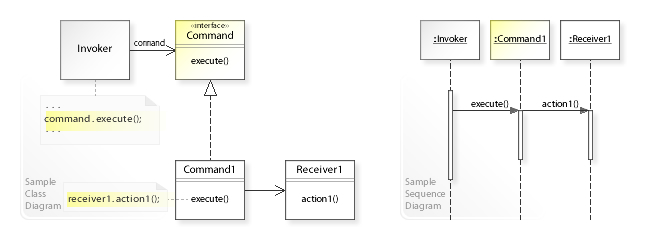
// Example with Light in Java
// Source: https://en.wikipedia.org/wiki/Command_pattern
import java.util.HashMap;

/** The Command interface */
interface Command {
    void execute();
}

/** The Invoker class */
class Switch {
    private final HashMap<String, Command> commandMap = new HashMap<>();

    public void register(String commandName, Command command) {
        commandMap.put(commandName, command);
    }

    public void execute(String commandName) {
        Command command = commandMap.get(commandName);
        if (command == null) {
            throw new IllegalStateException("no command registered for " + commandName);
        }
        command.execute();
    }
}

/** The Receiver class */
class Light {
    public void turnOn() {
        System.out.println("The light is on");
    }

    public void turnOff() {
        System.out.println("The light is off");
    }
}

/** The Command for turning on the light - ConcreteCommand #1 */
class SwitchOnCommand implements Command {
    private final Light light;

    public SwitchOnCommand(Light light) {
        this.light = light;
    }

    @Override // Command
    public void execute() {
        light.turnOn();
    }
}

/** The Command for turning off the light - ConcreteCommand #2 */
class SwitchOffCommand implements Command {
    private final Light light;

    public SwitchOffCommand(Light light) {
        this.light = light;
    }

    @Override // Command
    public void execute() {
        light.turnOff();
    }
}

public class CommandDemo {
    public static void main(final String[] arguments) {
        Light lamp = new Light();

        Command switchOn = new SwitchOnCommand(lamp);
        Command switchOff = new SwitchOffCommand(lamp);

        Switch mySwitch = new Switch();
        mySwitch.register("on", switchOn);
        mySwitch.register("off", switchOff);

        mySwitch.execute("on");
        mySwitch.execute("off");
    }
}
Let’s see what does all of this mean, and how do we actually do that:
- We create a Command object by making it inherit the Command interface. That interface would ave one single method: execute(). When we are going to create a concrete Command object, then we will implement execute() method to enact concrete steps. Later when client will be calling execute() method, they will not know any underlying logic, and will be very loosely coupled.
- Having same interface, we can interchange multiple different Command objects between themselves. The caller wouldn’t care which one it is – it will simple call execute() every time. So, in a sense, we parameterize objects with different requests.
- We can use this pattern to implement queue and log requests, where parameterization will be very handy. Optional undo method is simply a variable storing another Command object, which turns out to be the opposite to the latest executed.
- Lastly there is also something called a Macro Command. What it means is we create a command that has several Command objects in it and executes all of them. For example we can have a command that calls laundry, room service, and latest menu all at once. We don’t need to create a new command for that. We just put existing commands together in one.

# Example with Light in Python
# Source: https://en.wikipedia.org/wiki/Command_pattern
from collections import deque

class Switch(object):
    """The INVOKER class"""
    def __init__(self):
        self._history = deque()

    @property
    def history(self):
        return self._history

    def execute(self, command):
        self._history.appendleft(command)
        command.execute()

class Command(object):
    """The COMMAND interface"""
    def __init__(self, obj):
        self._obj = obj

    def execute(self):
        raise NotImplementedError

class TurnOnCommand(Command):
    """The COMMAND for turning on the light"""
    def execute(self):
        self._obj.turn_on()

class TurnOffCommand(Command):
    """The COMMAND for turning off the light"""
    def execute(self):
        self._obj.turn_off()

class Light(object):
    """The RECEIVER class"""
    def turn_on(self):
        print("The light is on")

    def turn_off(self):
        print("The light is off")

class LightSwitchClient(object):
    """The CLIENT class"""
    def __init__(self):
        self._lamp = Light()
        self._switch = Switch()

    @property
    def switch(self):
        return self._switch

    def press(self, cmd):
        cmd = cmd.strip().upper()
        if cmd == "ON":
            self._switch.execute(TurnOnCommand(self._lamp))
        elif cmd == "OFF":
            self._switch.execute(TurnOffCommand(self._lamp))
        else:
            print("Argument 'ON' or 'OFF' is required.")

# Execute if this file is run as a script and not imported as a module
if __name__ == "__main__":
    light_switch = LightSwitchClient()
    print("Switch ON test.")
    light_switch.press("ON")
    print("Switch OFF test.")
    light_switch.press("OFF")
    print("Invalid Command test.")
    light_switch.press("****")

    print("Command history:")
    print(light_switch.switch.history)
Command pattern is a very useful way of separating the client or the caller from details of the call. Client will always know that it has to call execute() method and that’s it. The rest is taken care by the Command object that passes more instructions down the line to get the desired result.

 Abstrakt Kode

